Stop right there.
Most websites shut out customers. Millions of them. People who cannot see the screen the way you do. People who navigate with a keyboard alone. People who need captions, clear contrast, or simple language. Your site may look fine to you. To them it is a locked door.
Here is the hard truth Rosser Reeves would hammer home: Buy accessibility—or rather, build it—and you get this specific benefit. You open your digital door to every customer who wants what you sell. You avoid the lawsuits, the lost sales, and the bad reputation that hit the businesses that ignore it. Competitors who treat accessibility as optional leave money and goodwill on the table. You will not.
That is the Unique Selling Proposition of digital accessibility. One clear benefit. Repeat it until it sticks. Accessibility is not charity. It is smart business that works.
Why This Matters Now
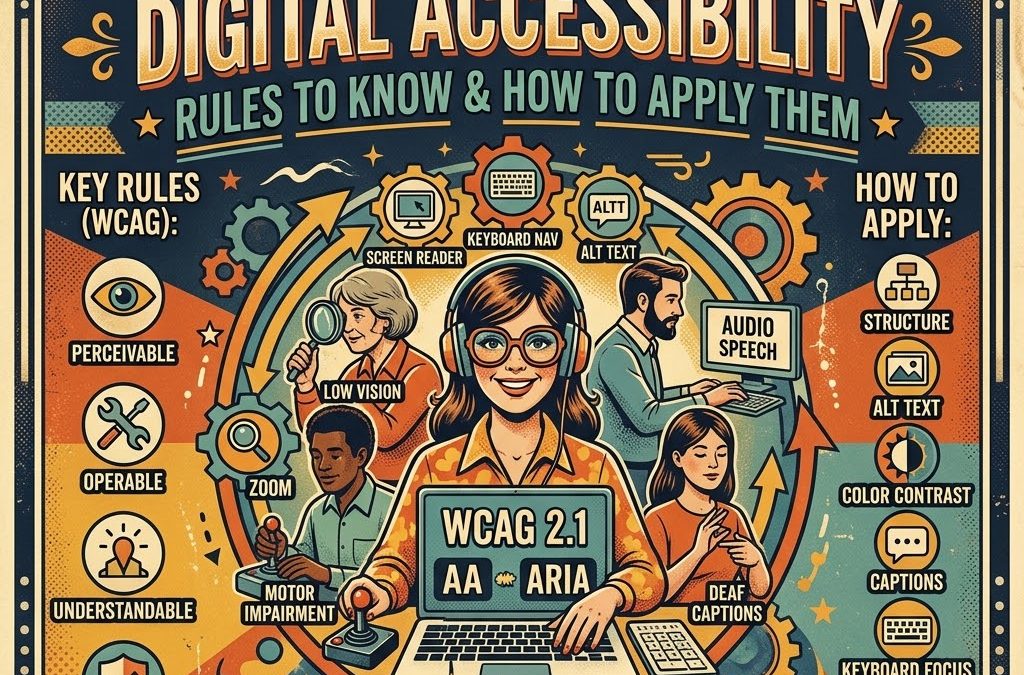
Digital accessibility means your website, apps, forms, videos, and documents can be used by people with disabilities—blindness, low vision, deafness, limited mobility, cognitive differences, and more. The standard is the Web Content Accessibility Guidelines (WCAG), currently at version 2.2. Most laws and courts point to Level AA as the practical target.
In the United States the Americans with Disabilities Act (ADA) already covers websites of businesses open to the public. State and local government sites face explicit WCAG 2.1 AA deadlines in 2026 and 2027. Europe’s Accessibility Act and other national rules push the same direction. Ignore the rules and you risk complaints, lawsuits, and lost customers. Follow them and you gain reach, better search rankings (search engines favor clear, structured content), higher conversion, and the simple advantage of treating every visitor as a potential buyer.
The Vinyl Signage Shop understands real-world business needs—custom vinyl, banners, vehicle graphics, print, and even website work. Accessibility is the same practical mindset applied online. Make the message reachable. Then watch the results.
The Four Rules: POUR
WCAG organizes everything under four principles. Remember them. Apply them. That is the complete framework.
1. Perceivable Information must be presentable in ways people can take in.
- Provide text alternatives (alt text) for every meaningful image. Decorative images get empty alt or are marked decorative.
- Captions and transcripts for audio and video.
- Enough color contrast: body text at least 4.5:1 against its background; larger text and UI components at least 3:1.
- Content that can be resized or reflowed without loss of meaning. Do not rely on color alone to convey information.
2. Operable Users must be able to operate the interface.
- Full keyboard access. Every interactive element reachable and usable without a mouse.
- Visible focus indicators so keyboard users always know where they are.
- Enough time to read and act. No sudden time limits that trap people.
- No content that flashes more than three times per second.
- Clear skip links and logical heading structure so people can navigate efficiently.
3. Understandable Content and operation must make sense.
- Clear, readable language. Avoid unnecessary jargon.
- Consistent navigation and labeling across pages.
- Helpful error messages on forms that explain what went wrong and how to fix it.
- Predictable behavior. Links and buttons do what users expect.
4. Robust Content must work with current and future assistive technologies.
- Clean, valid code that screen readers and other tools can interpret.
- Proper use of ARIA only when native HTML is not enough.
- Compatibility with browsers, devices, and assistive tech people actually use.
These four rules are not optional decoration. They are the proposition. Meet them and people with disabilities can buy from you, learn from you, and trust you. Miss them and you lose them—and invite trouble.
How to Apply Them: Practical Steps That Work
Start with an audit. Free tools such as browser extensions and WAVE, or paid services, will flag the obvious failures. Manual testing with a keyboard and a screen reader (NVDA or VoiceOver) reveals what automated checks miss.
Fix the high-impact items first:
- Add meaningful alt text to every informative image.
- Fix color contrast on text and buttons.
- Make every form and menu keyboard-operable and label every input clearly.
- Structure pages with proper headings (H1, H2, H3 in order).
- Caption videos and provide transcripts.
- Ensure focus is never hidden behind sticky headers or pop-ups.
- Test on real mobile devices and with real assistive technology.
Document your process. Create an accessibility statement that lists what you have done and how people can request help. Train your team so new content stays accessible. For ongoing work, build accessibility into design and development from the start—it costs far less than fixing it later.
If you run a local business—signs, print, vehicle graphics, websites—apply the same discipline to your own site that you bring to customer projects. Clear navigation, readable type, proper contrast, and alt text turn casual visitors into callers and buyers.
The Benefit That Pays
Accessible sites convert better because more people can complete the action you want. Search engines reward clear structure and usable content. You reduce legal risk. You demonstrate that your business values every customer. That reputation compounds.
Competitors who treat accessibility as an afterthought leave the door closed. You open it. That is unique. That is the selling proposition. Repeat it: Build accessibility and you reach customers others lose.
Your Next Move
Review your site this week against the POUR principles. Fix the biggest barriers first. If you need help with design, print materials that reinforce an accessible brand, or simply want a second set of eyes, reach out. The Vinyl Signage Shop is here for practical solutions that work in the real world.
Now it is your turn. Have you audited your website for accessibility yet? What barrier surprised you most, or what result have you seen after making changes? Drop a comment below. Your experience helps the next reader take action.
Accessibility is not a trend. It is the clear, rational benefit that moves customers your way. Apply the rules. Deliver the benefit. Watch the difference.



While We Have Your Attention - Here's A Couple of FREE Downloads

eCom Sales Trigger
You don’t need any coding expertise to deploy it on your store. Digital goods. Gift vouchers. Tickets for your own events. Donation drives. Fundraisers. Subscription services. Quote requests.
FB Audience Builder
This will help you build a super targeted facebook audience for your campaigns by collecting and extracting user data (Name & ID) from any post on facebok pages, groups, events and save data to a TXT file.
Speedy Content Publishing Tips
How to Write Quickly – Get Your Thoughts and Ideas onto the Page and Published In Less Time.
Facebook Auto Reply & Bulk PM Sender

Auto Reply/Message By Keyword Or By Post ID. Latest Facebook SDK v5 for PHP. Send Message To All Users Who Sent Private Messages. Send Message To All Users Who Replied On Posts.
Viral List Builder Plugin
Create your custom offer to your customers for their referrals. Easily place the form anywhere on your page with a short-code. Collect up to 10,000 emails per month.
Vantage Premium WordPress Theme

The Vantage Theme is one of the most popular Business Directory Themes for WordPress with various monetizing options.